Aadhaar Masking: Protecting Personal Information When Sharing Aadhaar Documents
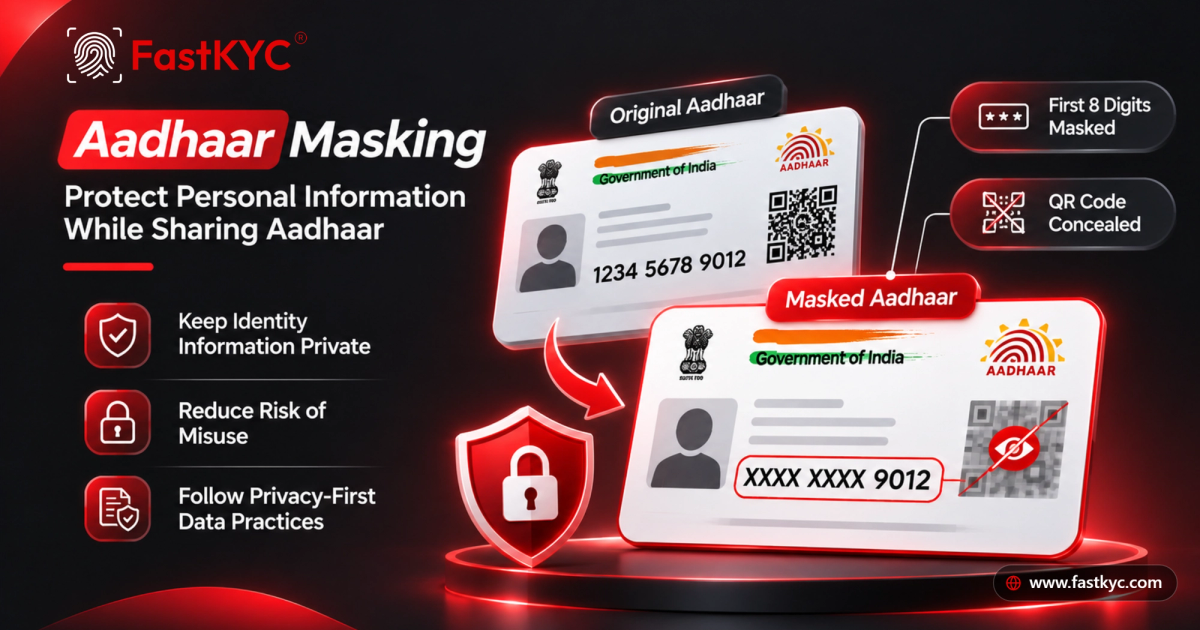
Aadhaar masking protects personal information by hiding the first eight digits and concealing QR codes in documents shared for reference.
Vaitheeshwari JSoftware Engineer
On this page 7 sections
Aadhaar is commonly used to establish identity in India. But sharing a full Aadhaar document when only limited details are needed can expose more personal information than necessary.
Aadhaar masking helps reduce that exposure. A masked Aadhaar displays only the last four digits of the 12-digit Aadhaar number. For copies shared only for reference, the QR code can also be obscured if it is not needed for verification.
What Is Aadhaar Masking?
Aadhaar masking means concealing sensitive details on a copy of an Aadhaar document before sharing or storing it.
For example, the number 1234 5678 9012 can be displayed as XXXX XXXX 9012. The original Aadhaar number is unchanged; only its appearance in the prepared copy is altered.
UIDAI also offers an official Masked Aadhaar e-Aadhaar, which shows only the last four digits of the number.
Why Mask an Aadhaar Document?
Sharing complete identity details unnecessarily can increase the risk of unauthorised access or misuse. Masking can help individuals and organisations:
- Limit exposure of the complete Aadhaar number.
- Reduce the sensitive information included in shared or stored copies.
- Support more privacy-conscious document-handling practices.
Masking is one part of protecting identity information. Documents should also be stored securely and shared only with appropriate recipients.
What About the QR Code?
The Aadhaar Secure QR Code supports offline identity verification and contains digitally signed information associated with the Aadhaar holder. Depending on the format, it may include details such as the holder’s name, address, gender, date of birth, photograph, and masked contact information.
If a document is being shared only as a reference copy, obscuring the QR code can prevent it from being scanned. However, a copy with an obscured QR code cannot be used for QR-based verification. Keep the QR code intact when it is required for an authorised verification process.
When Is Masking Useful?
A masked copy may be suitable when a document is needed for reference or record-keeping, but the recipient does not need the full Aadhaar number or QR code. This can apply to some employee, customer, vendor, or internal document records.
The right document format depends on the purpose of collection, applicable requirements, and the verification method. Confirm what information is required before preparing or sharing a copy.
Masked and Unmasked Aadhaar: The Difference
An unmasked Aadhaar displays the complete 12-digit number, and its QR code may be scannable. A masked copy displays only the last four digits; the QR code may also be obscured in a reference copy.
Masking changes only the prepared document copy. It does not change the Aadhaar number or the information held by UIDAI.
Best Practices for Handling Aadhaar Documents
- Mask the first eight digits when the full number is not required.
- Obscure the QR code in reference copies when QR-based verification is not needed.
- Keep the QR code intact when it is required for an authorised verification process.
- Limit access to unmasked documents.
- Share documents through secure channels and store them with appropriate access controls.
- Review the prepared copy before sharing to make sure the intended details are concealed.
- Follow applicable Aadhaar and data-protection requirements.
How to Download a Masked Aadhaar Online
- Visit the official UIDAI MyAadhaar portal.
- Sign in using your Aadhaar number and the OTP sent to your registered mobile.
- Choose Download Aadhaar and select the Masked Aadhaar option.
- Download the PDF.
Simplify Aadhaar Masking with FastKYC
FastKYC helps businesses prepare Aadhaar documents with the first eight digits concealed and the QR code obscured in copies intended for reference. This can support workflows that aim to reduce unnecessary exposure of identity information.
Use a masked copy when it suits the purpose, and share only the Aadhaar details the recipient needs.
Protect Aadhaar information. Share only what is necessary.
- Aadhaar Masking
- Data Privacy
- Secure Document Sharing