

OCR: Business Applications and Benefits
Learn what OCR is, how optical character recognition works, its key benefits, common business applications, and how it simplifies document processing.
Harsine K USoftware Engineer
On this page 8 sections
Businesses handle documents every day, from customer identity proofs to financial records and business certificates. Extracting information from these documents manually can slow down operations and increase the effort required to process applications.
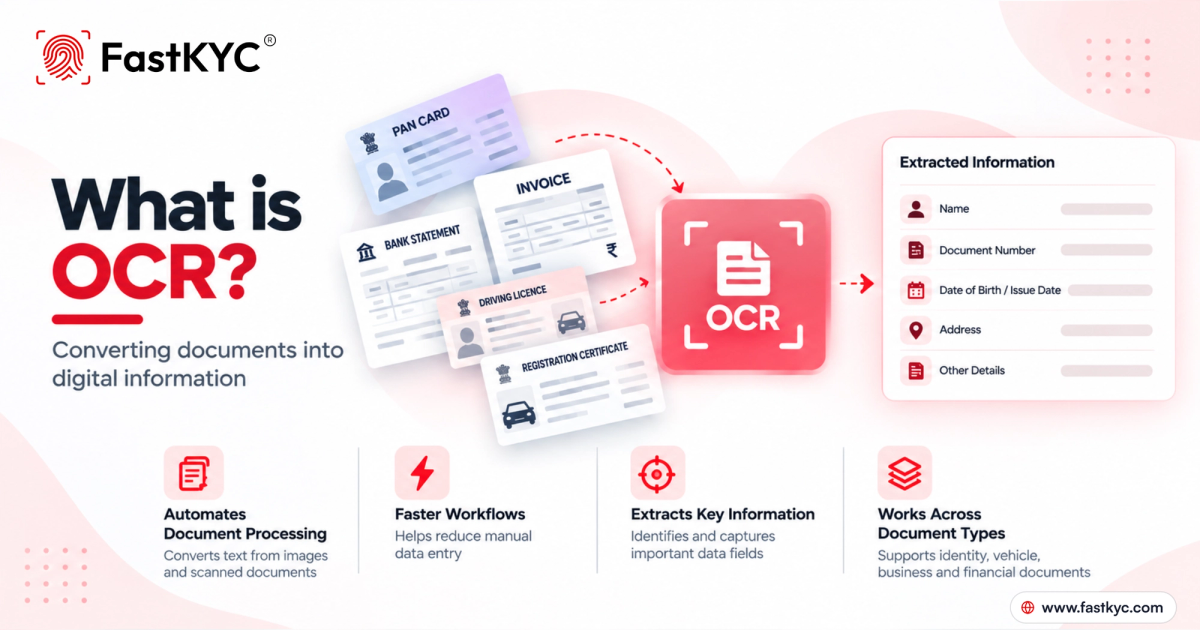
OCR helps to automate document processing by converting text in images and scanned documents into digital information that applications can use.
What Is OCR?
Optical Character Recognition (OCR) is a technology that recognises text within images, scanned documents, and supported files and converts it into machine-readable text.
For example, when a business receives a scanned invoice, OCR can recognise details such as the invoice number, supplier name, date, and total amount. These details can then be processed digitally instead of being entered manually.
How Does OCR Work?
- Document input: The process begins with an image, scan, or supported document file.
- Image processing: The document image is enhanced to improve text clarity and support accurate recognition.
- Text recognition: OCR identifies characters, words, and numbers within the document.
- Information extraction: Relevant information is organised into fields or sections, depending on the document and the solution.
- Data output: The extracted information is made available for use in applications and workflows.
The quality of the original document affects the result. Blurred images, poor lighting, cropped text, and unusual layouts can reduce recognition accuracy.
Benefits of OCR
- Reduced manual effort: Limits the need to type information from documents.
- Faster processing: Helps shorten repetitive document-handling steps.
- Consistent data capture: Organises extracted information into a format that applications can process.
- Fewer transcription errors: Reduces mistakes associated with manual copying, although OCR results still require validation.
- Scalable processing: Helps manage larger document volumes without relying entirely on manual data entry.
Applications of OCR
OCR is used across several industries and workflows to convert document-based information into digital records.
- Banking and lending: Extract information from identity documents, bank statements, and income records to support onboarding and financial assessments.
- Accounting and finance: Extract invoice numbers, tax details, transaction records, and totals for financial workflows.
- Vehicle finance and logistics: Capture registration details from vehicle documents and information from driving licences.
- Business registration: Process information from business registration certificates and tax-related documents.
- Employee Onboarding: Extract salary and employment details from supported payslips and other employee documents.
- Document management: Digitise scanned records and make their contents easier to search, retrieve, and organise.
What Is a KYC Document Classifier?
A KYC Document Classifier identifies the type of identity document submitted by a user. It is useful when an application accepts multiple types of identity proof and needs to determine which document has been uploaded.
The classifier helps to:
- Automatically classify uploaded identity documents.
- Simplify document handling when multiple ID types are accepted.
- Direct documents to the appropriate OCR workflow.
- Reduce manual document sorting and processing.
A document classifier identifies the type of document submitted, while OCR extracts the text and information contained in it. Classification alone does not extract all document fields or verify authenticity.
OCR vs Document Verification
OCR and document verification serve different purposes.
OCR extracts text and information from a document. Document verification checks relevant information or document validity through an appropriate verification process.
For example, PAN OCR can extract a PAN number from an uploaded card image. A separate PAN verification service can check the details against the records it supports.
Combining OCR with verification helps automate document data capture and subsequent identity checks. OCR alone does not establish that a document is genuine, valid.
Factors Affecting OCR Accuracy
- Image clarity: Clear, well-lit images support better text recognition.
- Document format: Different layouts and formatting can influence how accurately text is identified.
- Text readability: Printed text is generally easier to recognise than unclear handwriting.
- Data validation: Reviewing extracted information helps identify potential recognition errors.
Using clear document images and validating important fields helps businesses improve the reliability of OCR-based document processing.
FastKYC OCR Solutions
FastKYC provides document-specific OCR solutions across various document categories, along with a KYC Document Classifier that identifies supported identity document types.
- Identity documents: PAN, Aadhaar, driving licence, passport, and voter ID.
- Vehicle documents: Registration Certificate (RC).
- Business documents: GST, Udyam, and Certificate of Incorporation.
- Financial documents: Bank statements, bank passbooks, cheques, invoices, payslips, selected ITR documents, payment receipts, and mobile purchase invoices.
- OCR
- Document Classification
- Data Extraction
- OCR API